
LLM Agent#
The basic agent class in MS-Agent is LLMAgent. MS-Agent’s conversational capabilities and tool invocation are all handled through this class. The diagram is as follows:
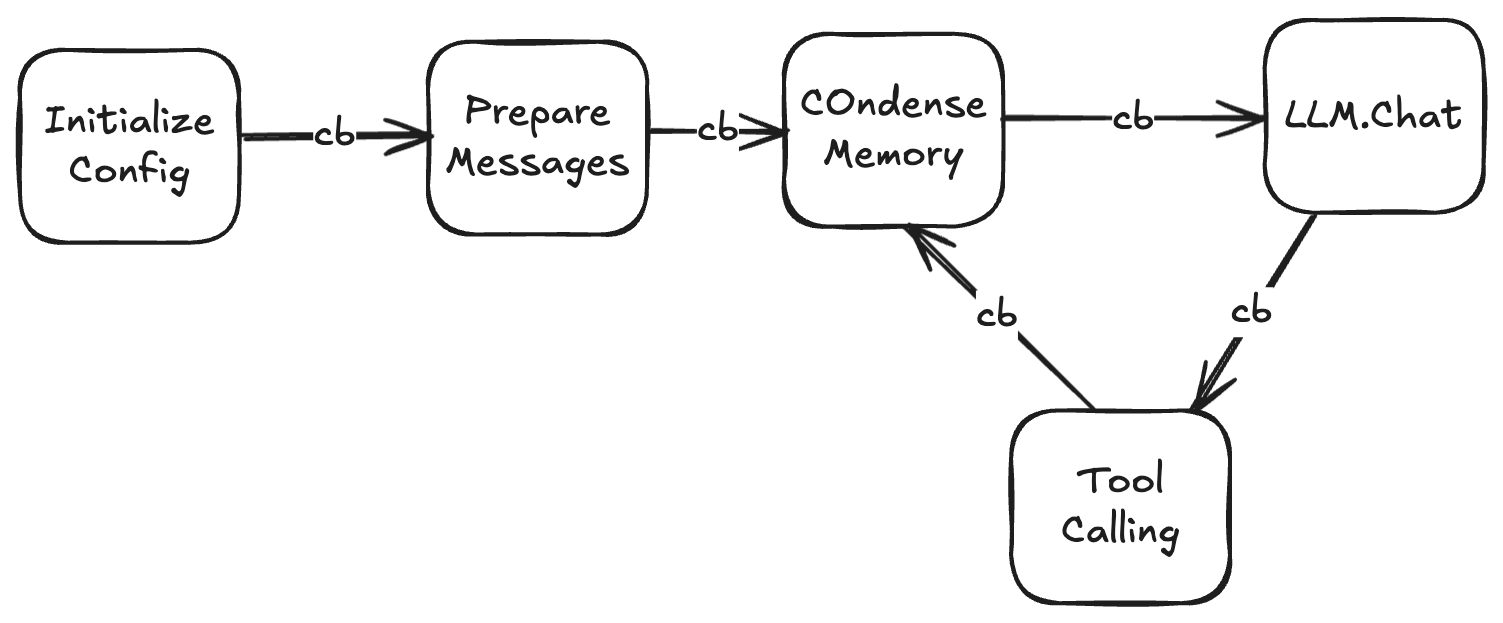
LLMAgent initializes config during construction. Then it proceeds sequentially:
Register callbacks configured in config
Initialize LLM, tools, message management, rag
Read message history cache (if any)
Prepare messages, such as performing rag queries, adding plans, etc.
Enter loop, attempt to compress messages
Prepare tool list, call LLM
Call tools based on LLM results, restart loop
Loop termination conditions:
The model made a reply but without any tool calls
Reached the number of rounds specified by max_chat_round in config
callbacks#
Developers can customize the Agent execution flow through callbacks. Callbacks can be configured as follows:
custom_callback.py
from ms_agent.callbacks import Callback

class CustomCallback(Callback):

    def on_generate_response(self, runtime,
                                   messages):
        ...
agent.yaml
callbacks:
  - custom_callback
This means there is a custom_callback.py file at the same level as the yaml file. This file contains subclasses that inherit from the Callback class and implement certain specific methods. Supported callbacks include:
on_task_begin: Called when task begins execution
on_generate_response: Called before calling LLM
on_tool_call: Called before calling tool
after_tool_call: Called after calling tool
on_task_end: Called after task completion
As an auxiliary mechanism, callbacks have low readability, so it’s recommended to execute less complex processes in callbacks, such as controlling process termination, printing logs, etc. If you need to customize the Agent, please consider directly inheriting from LLMAgent.
Custom Agent#
If more customization is needed, you can consider inheriting from the LLMAgent class and overriding certain methods. Defining a new Agent class follows the same process as defining callbacks above:
custom_agent.py
from ms_agent.agent import LLMAgent

class CustomAgent(LLMAgent):

    # For example, override the condense memory function
    async def condense_memory(self, messages):
        ...
agent.yaml
code_file: custom_agent
In this case, agent.yaml will use your custom agent class instead of loading the LLMAgent class for execution.
Examples#
A basic agent.yaml: https://www.modelscope.cn/models/ms-agent/simple_agent
Agent with external code: https://www.modelscope.cn/models/ms-agent/simple_agent_code
Using callbacks to complete complex workflows: https://github.com/modelscope/ms-agent/tree/main/projects/code_genesis