Deep Research#
The DeepResearch project of MS-Agent provides an Agent workflow with complex task-solving capabilities, designed to generate in-depth, multimodal research reports for domains such as scientific research. Two versions are currently available: one for lightweight, efficient, low-cost investigation, and another for deep, comprehensive, large-scale research.
Principle Overview#
Base Version#
The base version supports the following core features:
Autonomous Exploration: Automatic exploration and analysis of complex questions across diverse directions.
Multimodality: Supports handling multiple data modalities and extracting original chart/graph information to generate rich, illustrated reports.
Lightweight & Efficient: Uses a “search-then-execute” paradigm—requiring only modest token consumption and completing tasks in minutes. Document parsing can be accelerated via Ray.
Upon receiving the user’s query and required configuration parameters, the workflow proceeds as illustrated below:
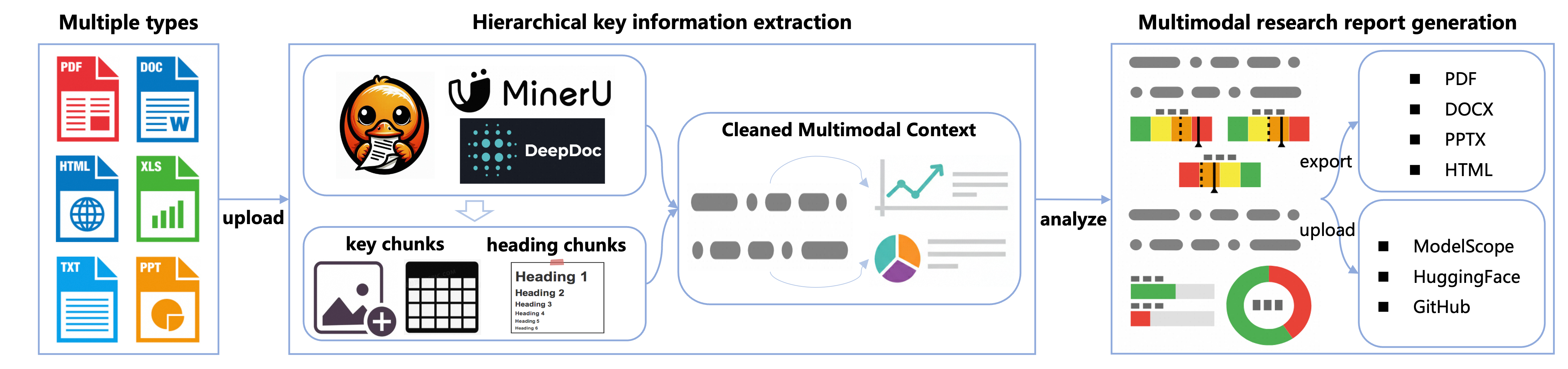
The workflow executes in the following steps:
Input Processing: Accepts the user query, search engine configuration, etc., and performs initialization.
Search & Parsing: Rewrites the user query, performs web search, and extracts core chunks—including charts—using a hierarchical key information extraction strategy, while preserving multimodal context.
Report Generation: Generates a multimodal research report retaining essential visual elements; supports export in multiple formats and upload to various platforms.
Extended Version#
While preserving the multimodal processing and generation capabilities of the base version, the extended version adds the following core features:
Intent Clarification: Optionally clarifies user intent via human feedback; supports multiple response modes (report / concise answer).
Deep Search: Recursively optimizes search paths to broaden recall coverage and deepen topic exploration; automatically decides whether to continue based on user budget and research progress.
Context Compression: Supports long-context compression to maintain stable output quality even across multi-round searches and parsing of massive documents.
Given the user query, search budget, and configuration parameters, the workflow proceeds as illustrated below:
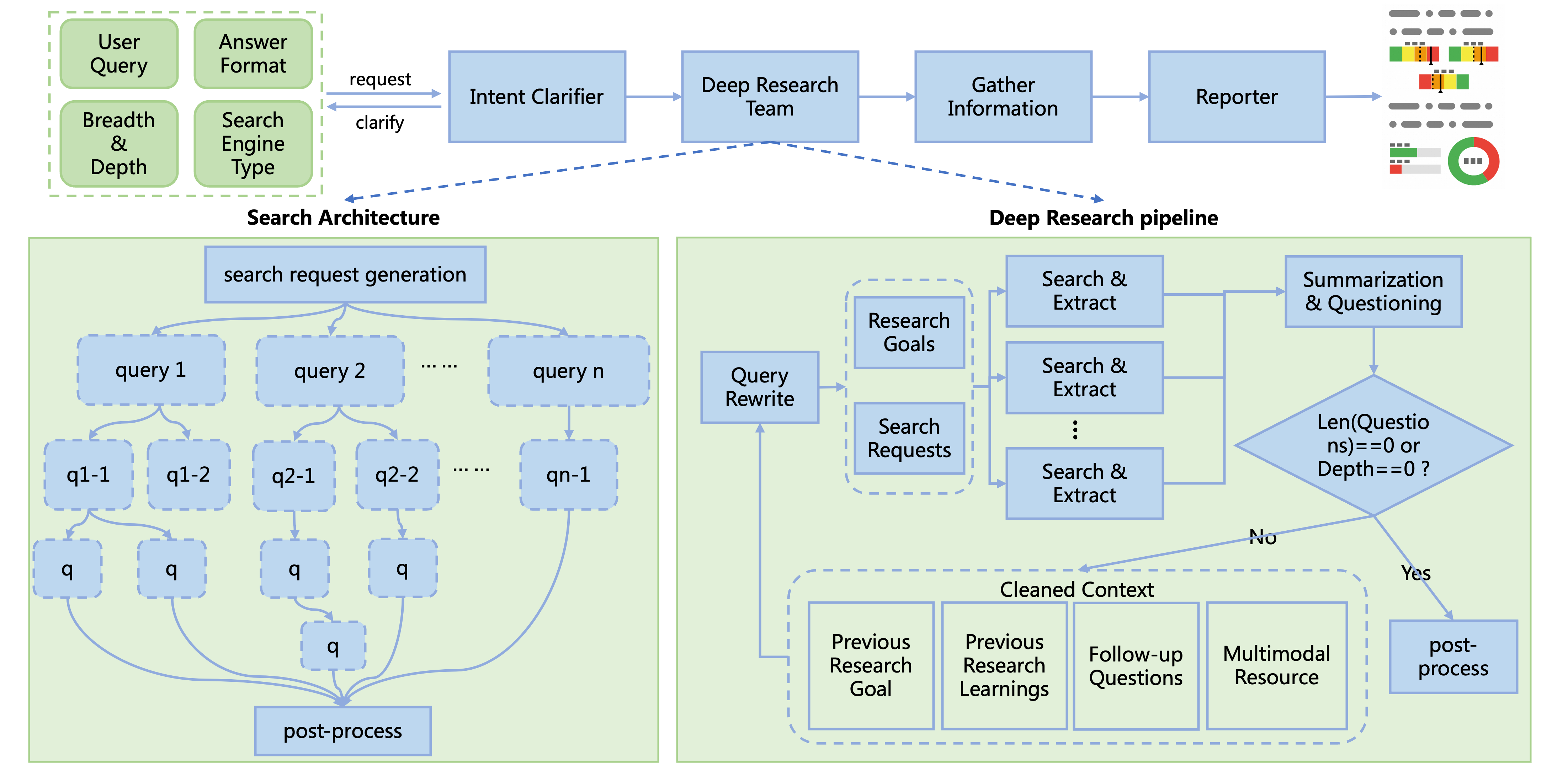
The workflow executes in the following steps:
Intent Clarification: Receives the user query and proactively asks clarifying questions to refine the research direction; skips this step if the user input is already sufficiently precise.
Query Rewriting: Generates search queries and research objectives based on the current question, exploration history (past research questions & conclusions), and search engine type.
Search & Parsing: Executes search, document parsing, and information extraction—retaining multimodal context via hierarchical extraction.
Context Compression: Condenses extracted multimodal context into information-dense summaries and follow-up research questions, preserving chart–text contextual relationships.
Recursive Search: Repeats the above steps until target research depth is reached or no further questions remain.
Report Generation: Consolidates search history and produces either a multimodal report or a concise reply, according to user preference.
Usage Guide#
Installation#
To install the Deep Research project, follow these steps:
# Install from source
git clone https://github.com/modelscope/ms-agent.git
cd ms-agent
pip install -r requirements/research.txt
pip install -e .

# Install via PyPI (≥v1.1.0)
pip install 'ms-agent[research]'
Running#
Environment Configuration#
Currently, the project defaults to using the free arXiv search (no API key required). To use more general search engines, you can switch to Exa or SerpApi.
Copy and edit the .env file to configure environment variables
# Edit the `.env` file to include the API key for the desired search engine
cp .env.example .env

# Use Exa search configuration as follows (register at https://exa.ai, free credits upon registration):
EXA_API_KEY=your_exa_api_key

# Use SerpApi search configuration as follows (register at https://serpapi.com, free credits monthly):
SERPAPI_API_KEY=your_serpapi_api_key

# Additional configuration is required for the extended version (ResearchWorkflowBeta).
# Extended version (ResearchWorkflowBeta) employs a more stable model (e.g., gemini-2.5-flash) during the query rewriting phase.
# OpenAI API key (OPENAI_API_KEY) and base URL (OPENAI_BASE_URL) must be set to use the compatible endpoint.
# If you wish to change the model, modify the model name in ResearchWorkflowBeta.generate_search_queries.
OPENAI_API_KEY=your_api_key
OPENAI_BASE_URL=https://your-openai-compatible-endpoint/v1
Use conf.yaml to configure the search engine
SEARCH_ENGINE:
    engine: exa
    exa_api_key: $EXA_API_KEY
Code Samples#
Base Version Quick Start Code
from ms_agent.llm.openai import OpenAIChat
from ms_agent.tools.search.search_base import SearchEngine
from ms_agent.tools.search_engine import get_web_search_tool
from ms_agent.workflow.deep_research.principle import MECEPrinciple
from ms_agent.workflow.deep_research.research_workflow import ResearchWorkflow


def run_workflow(user_prompt: str,
                 task_dir: str,
                 chat_client: OpenAIChat,
                 search_engine: SearchEngine,
                 reuse: bool,
                 use_ray: bool = False):
    """
    Run the deep research workflow, which follows a lightweight and efficient pipeline.

    Args:
        user_prompt: The user prompt.
        task_dir: The task directory where the research results will be saved.
        chat_client: The chat client.
        search_engine: The search engine.
        reuse: Whether to reuse the previous research results.
        use_ray: Whether to use Ray for document parsing/extraction.
    """

    research_workflow = ResearchWorkflow(
        client=chat_client,
        principle=MECEPrinciple(),
        search_engine=search_engine,
        workdir=task_dir,
        reuse=reuse,
        use_ray=use_ray,
    )

    research_workflow.run(user_prompt=user_prompt)


if __name__ == '__main__':

    query: str = 'Survey of the AI Agent within the recent 3 month, including the latest research papers, open-source projects, and industry applications.'  # noqa
    task_workdir: str = '/path/to/your_task_dir'
    reuse: bool = False

    # Get chat client OpenAI compatible api
    # Free API Inference Calls - Every registered ModelScope user receives a set number of free API inference calls daily, refer to https://modelscope.cn/docs/model-service/API-Inference/intro for details.  # noqa
    """
    * `api_key` (str), your API key, replace `xxx-xxx` with your actual key. Alternatively, you can use ModelScope API key, refer to https://modelscope.cn/my/myaccesstoken  # noqa
    * `base_url`: (str), the base URL for API requests, `https://api-inference.modelscope.cn/v1/` for ModelScope API-Inference
    * `model`: (str), the model ID for inference, `Qwen/Qwen3-235B-A22B-Instruct-2507` can be recommended for document research tasks.
    """
    chat_client = OpenAIChat(
        api_key='xxx-xxx',
        base_url='https://api-inference.modelscope.cn/v1/',
        model='Qwen/Qwen3-235B-A22B-Instruct-2507',
    )

    # Get web-search engine client
    # Please specify your config file path, the default is `conf.yaml` in the current directory.
    search_engine = get_web_search_tool(config_file='conf.yaml')

    # Enable Ray with `use_ray=True` to speed up document parsing.
    # It uses multiple CPU cores for faster processing,
    # but also increases CPU usage and may cause temporary stutter on your machine.
    run_workflow(
        user_prompt=query,
        task_dir=task_workdir,
        reuse=reuse,
        chat_client=chat_client,
        search_engine=search_engine,
        use_ray=False,
    )
Extended Version Quick Start Code
import asyncio

from ms_agent.llm.openai import OpenAIChat
from ms_agent.tools.search.search_base import SearchEngine
from ms_agent.tools.search_engine import get_web_search_tool
from ms_agent.workflow.deep_research.research_workflow_beta import ResearchWorkflowBeta


def run_deep_workflow(user_prompt: str,
                      task_dir: str,
                      chat_client: OpenAIChat,
                      search_engine: SearchEngine,
                      breadth: int = 4,
                      depth: int = 2,
                      is_report: bool = True,
                      show_progress: bool = True,
                      use_ray: bool = False):
    """
    Run the expandable deep research workflow (beta version).
    This version is more flexible and scalable than the original deep research workflow.

    Args:
        user_prompt: The user prompt.
        task_dir: The task directory where the research results will be saved.
        chat_client: The chat client.
        search_engine: The search engine.
        breadth: The number of search queries to generate per depth level.
        In order to avoid the explosion of the search space,
        we divide the breadth by 2 for each depth level.
        depth: The maximum research depth.
        is_report: Whether to generate a report.
        show_progress: Whether to show the progress.
        use_ray: Whether to use Ray for document parsing/extraction.
    """

    research_workflow = ResearchWorkflowBeta(
        client=chat_client,
        search_engine=search_engine,
        workdir=task_dir,
        use_ray=use_ray,
        enable_multimodal=True)

    asyncio.run(
        research_workflow.run(
            user_prompt=user_prompt,
            breadth=breadth,
            depth=depth,
            is_report=is_report,
            show_progress=show_progress))


if __name__ == "__main__":

    query: str = 'Survey of the AI Agent within the recent 3 month, including the latest research papers, open-source projects, and industry applications.'  # noqa
    task_workdir: str = '/path/to/your_workdir'  # Specify your task work directory here

    # Get chat client OpenAI compatible api
    # Free API Inference Calls - Every registered ModelScope user receives a set number of free API inference calls daily, refer to https://modelscope.cn/docs/model-service/API-Inference/intro for details.  # noqa
    """
    * `api_key` (str), your API key, replace `xxx-xxx` with your actual key. Alternatively, you can use ModelScope API key, refer to https://modelscope.cn/my/myaccesstoken  # noqa
    * `base_url`: (str), the base URL for API requests, `https://api-inference.modelscope.cn/v1/` for ModelScope API-Inference
    * `model`: (str), the model ID for inference, `Qwen/Qwen3-235B-A22B-Instruct-2507` can be recommended for document research tasks.
    """
    chat_client = OpenAIChat(
        api_key='xxx-xxx',
        base_url='https://api-inference.modelscope.cn/v1/',
        model='Qwen/Qwen3-235B-A22B-Instruct-2507',
        generation_config={'extra_body': {
            'enable_thinking': False
        }})

    # Get web-search engine client
    # Please specify your config file path, the default is `conf.yaml` in the current directory.
    search_engine = get_web_search_tool(config_file='conf.yaml')

    # Enable Ray with `use_ray=True` to speed up document parsing.
    # It uses multiple CPU cores for faster processing,
    # but also increases CPU usage and may cause temporary stutter on your machine.
    # Tip: combine use_ray=True with show_progress=True for a better experience.
    run_deep_workflow(
        user_prompt=query,
        task_dir=task_workdir,
        chat_client=chat_client,
        search_engine=search_engine,
        show_progress=True,
        use_ray=False,
    )